
SEO Site Analysis: A Practical Guide to Improving Your Website
SEO Site Analysis: A Practical Guide to Improving Your Website
SEO site analysis is the process of reviewing a website to understand how well it can be discovered, crawled and understood by search engines—and how effectively it meets the needs of visitors. A thorough analysis can reveal technical problems, content gaps and opportunities to improve visibility in organic search.
Whether you manage a small business website or a large online shop, regular analysis helps you make informed improvements rather than relying on guesswork. The aim is not simply to attract more visits, but to bring the right people to useful pages and make it easy for them to take the next step.
What does an SEO site analysis cover?
A complete review usually looks at several areas. These are closely connected: excellent content may struggle to perform if search engines cannot access it, while a technically sound website may still fall short if its pages do not answer users’ questions.
- Technical SEO: How easily search engines can crawl, render and index the website.
- On-page SEO: How clearly each page communicates its subject and purpose.
- Content quality: Whether the content is useful, accurate, relevant and distinctive.
- Website structure: How pages are organised and connected through navigation and internal links.
- User experience: Whether the site is accessible, easy to use and performs well on different devices.
- Authority and links: The quality and relevance of links pointing to the website.
- Measurement: Whether suitable tools are in place to track search performance and meaningful outcomes.
Check crawling and indexation
Search engines need to discover and access a page before they can consider showing it in search results. Start by checking whether important pages are available to crawlers and whether any unwanted pages are being indexed.
Review the website’s robots.txt file, XML sitemap and page-level indexing directives. The robots file can guide crawlers, but it should not be used as a way to remove a page from search results. If a page should not appear in search, the correct approach depends on the situation and may involve a noindex directive or another appropriate method.
Use Google Search Console to inspect important URLs and identify indexing issues. Pay particular attention to valuable pages that are excluded, pages that return errors, and unexpected duplicate versions. A sitemap should contain the canonical URLs of pages you want search engines to discover, rather than every URL the website generates.
Review technical performance
Technical issues can prevent pages from being accessed or make the site frustrating to use. Check for broken links, server errors, redirect chains and pages that load unreliably. Confirm that important pages use HTTPS and that redirects point visitors and search engines to the correct destination.
Page speed and responsiveness also matter. Test the site on mobile devices and look for slow-loading resources, oversized images, intrusive pop-ups and layout shifts. Google’s Core Web Vitals can help assess loading, interactivity and visual stability, but these measurements should be considered alongside real-world usability.
Structured data may help search engines interpret certain kinds of content and can make a page eligible for enhanced search results. Use relevant structured data accurately, follow current search engine guidelines and check for errors. Adding structured data does not guarantee a rich result or higher rankings.
Examine site structure and internal links
A clear website structure helps visitors find information and helps search engines understand how pages relate to one another. Important pages should be accessible through sensible navigation and should not be buried several clicks deep without a good reason.
Review internal links to see whether they connect related pages and use descriptive anchor text. Look for valuable pages with few or no internal links, often called orphan pages. Also check that links do not lead to outdated URLs or error pages.
For larger sites, consider whether categories, subcategories and URL patterns are consistent. Faceted navigation and other automatically generated URLs can create large numbers of similar pages, so review how these are managed and whether they need to be crawlable or indexed.
Assess page-level SEO
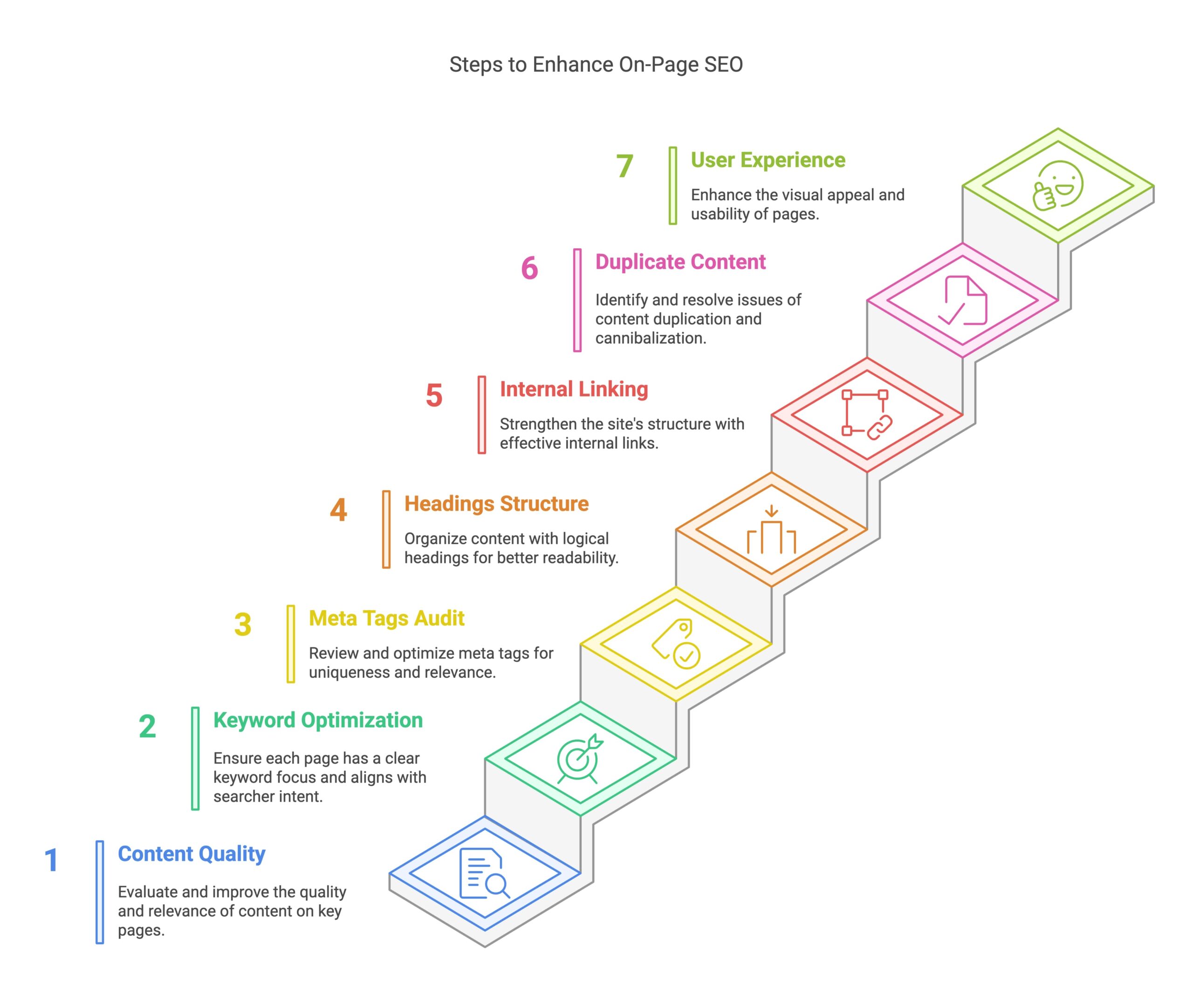
Each important page should have a clear purpose and provide a strong answer to the visitor’s likely question. Review page titles, headings, introductory copy, image descriptions and meta descriptions. These elements should accurately represent the page rather than repeat keywords unnaturally.
Check that every page has a distinct, descriptive title and a logical heading structure. A useful title helps people understand what to expect in search results. A well-written meta description can encourage relevant clicks, although search engines may choose to display different text.
Make sure the page’s main topic is clear and that related terms appear naturally where they help explain the subject. Avoid creating multiple pages that compete to answer the same query unless each page serves a genuinely different purpose.
Evaluate content quality and relevance
Content analysis involves more than checking word count or adding keywords. Ask whether each page is accurate, helpful and written for its intended audience. Does it answer the question thoroughly? Is the information current? Does the page offer a clear reason for visitors to choose it over similar results?
Review existing content for outdated details, unclear explanations and unsupported claims. Some pages may benefit from updating, combining or redirecting; others may be better left unchanged. Make decisions based on the page’s purpose, performance and value to users rather than applying the same treatment to every URL.
For commercial pages, ensure that product or service information is clear and complete. For informational pages, explain the topic in a way that is easy to follow, use trustworthy sources where appropriate and distinguish established facts from opinion.
Check mobile usability and accessibility
Visitors should be able to use the website comfortably on phones, tablets and desktop computers. Check that text is readable, buttons are easy to tap, menus work properly and important content is not hidden or difficult to reach on smaller screens.
Accessibility improvements often benefit all users. Use meaningful headings, descriptive link text, sufficient colour contrast and alternative text for informative images. Make sure forms provide clear labels and that key functions can be used with a keyboard. Accessibility is a broad discipline, so automated checks should be treated as a starting point rather than a complete assessment.
Review links and online reputation
Links from other websites can help search engines discover pages and provide context about a website’s reputation. Review your backlink profile for relevant, editorially earned links as well as unusual patterns that may need investigation.
Do not assume that every low-quality link requires action, and avoid buying links or using schemes designed to manipulate rankings. Focus on earning attention through useful resources, strong products and credible relationships with relevant organisations and publishers.
Use data to find opportunities
SEO analysis is more effective when technical findings are compared with performance data. Google Search Console can show queries, impressions, clicks and indexing information. Analytics tools can help you understand what visitors do after arriving, provided they are configured appropriately and used in line with applicable privacy requirements.
Look for pages that receive impressions but few clicks, pages that attract relevant traffic but do not lead to enquiries or sales, and important pages that have lost visibility. These patterns can point towards opportunities to improve page titles, clarify content, strengthen internal links or fix technical problems.
How to prioritise your findings
An analysis can produce a long list of recommendations. Prioritise work by considering its potential impact, the number of pages affected, the confidence in the diagnosis and the effort required to fix it.
- Resolve critical access problems: Address blocked important pages, widespread errors and serious security issues.
- Fix high-impact technical faults: Correct broken templates, incorrect redirects and indexation problems affecting valuable pages.
- Improve key landing pages: Update pages that matter most to the organisation’s goals and users’ needs.
- Strengthen site structure: Improve navigation and internal links so important content is easier to find.
- Plan ongoing improvements: Schedule content updates, performance checks and measurement reviews.
Record each issue, its affected URLs, recommended action, priority and owner. This makes it easier to track progress and prevents the same problems from being rediscovered in later reviews.
How often should you analyse a website?
There is no single schedule that suits every website. A small, stable site may need a detailed review periodically, while a large or frequently updated site may require ongoing monitoring. Analyse the site after major redesigns, platform changes, migrations or significant changes in search performance.
Regular checks can catch problems early, but avoid making several major changes at once without a plan. Keep a record of changes and monitor their effects over an appropriate period. Search visibility can fluctuate for many reasons, so assess trends rather than reacting to a single day’s results.
Conclusion
SEO site analysis provides a structured way to understand what is helping or hindering a website’s organic performance. By reviewing technical health, content, structure, usability and performance data, you can identify practical improvements and focus on the changes most likely to benefit visitors and the business.
The strongest analysis is not a one-off checklist. It is an ongoing process of finding issues, prioritising solutions, measuring outcomes and refining the website as users’ needs and search technology evolve.
8 Essential Tips for Effective SEO Site Analysis
- Check page titles and meta descriptions for relevance and length.
- Review headings to ensure a clear content structure.
- Test page speed on mobile and desktop.
- Find broken links and redirect chains.
- Check that important pages are crawlable and indexed.
- Review internal links to support key pages.
- Analyse organic traffic and rankings for trends.
- Check image alt text and URL structure for clarity.
Check page titles and meta descriptions for relevance and length.
Check that every important page has a unique title and meta description that accurately reflect its content and include relevant search terms naturally. Keep them concise enough to display clearly in search results: titles are often best around 50–60 characters and meta descriptions around 150–160, though display length varies by device and search query. Avoid keyword stuffing, and make each description useful and appealing so people know what to expect before clicking.
Review headings to ensure a clear content structure.
Review the headings on each page to make sure they create a clear, logical content structure. A descriptive main heading should introduce the topic, with subheadings dividing the information into easy-to-follow sections. Use heading levels in order, without choosing them simply for their visual appearance, and make each heading accurately describe the content that follows. Clear headings help visitors scan a page and make it easier for search engines to understand how its information is organised.
Test page speed on mobile and desktop.
Test your website’s page speed on both mobile and desktop devices, as performance can vary between screen sizes, connections and browsers. Use tools such as Google PageSpeed Insights to identify slow-loading pages and understand what may be affecting them, including large images, render-blocking resources or excessive scripts. Prioritise fixes that improve the experience for real visitors, and retest after making changes to check whether loading times have improved.
Find broken links and redirect chains.
As part of an SEO site analysis, check for broken links and redirect chains. Broken links can frustrate visitors and prevent search engines from reaching useful pages, while long chains of redirects can slow down access and waste crawl resources. Use a site-crawling tool to identify affected URLs, then update links to point directly to the correct destination, restore missing pages where appropriate, or add a relevant redirect. Keeping links accurate and redirects simple helps create a smoother experience for both visitors and search engines.
Check that important pages are crawlable and indexed.
Check that your most important pages can be crawled by search engines and are eligible to appear in search results. Review your robots.txt file, page-level indexing settings and XML sitemap, then use Google Search Console’s URL Inspection tool to check key pages. Look for valuable pages that are blocked, marked “noindex” or excluded from the index, and fix any issues that could prevent people from finding them through organic search.
Review internal links to support key pages.
Review your website’s internal links to make sure important pages are easy for visitors and search engines to find. Link to key pages from relevant, well-visited pages, and use clear, descriptive anchor text so people know what to expect. Check for broken links and important pages with few or no links pointing to them, then add useful connections where they fit naturally.
Analyse organic traffic and rankings for trends.
Analyse organic traffic and keyword rankings over time to spot meaningful trends, rather than reacting to short-term fluctuations. Look for changes in clicks, impressions, average positions and the landing pages receiving visits, then compare them with previous periods and seasonal patterns. A sustained decline may point to technical issues, outdated content or stronger competition, while steady growth can reveal topics and pages worth developing further. Use tools such as Google Search Console and analytics reports to guide your investigation, and connect changes in search performance to real outcomes such as enquiries or sales.
Check image alt text and URL structure for clarity.
Check that every informative image has concise, descriptive alt text that explains its purpose or content, rather than stuffing it with keywords. Decorative images can usually have empty alt text so screen readers can skip them. Review your URLs too: keep them short, readable and relevant to the page, using clear words separated by hyphens. Avoid unnecessary numbers, long strings of parameters and frequent URL changes, as a clear structure helps visitors and search engines understand how your content is organised.